
Insights7 min read
Google Stitch: How AI is Transforming UI/UX Design and Helping Business Analysts Bring Ideas to Life
Deepanshu Singhal
Every successful application begins with a simple idea. The idea sounds simple, but turning it into something everyone can understand is often the biggest challenge.
“We need a customer portal.” “We need an employee self-service platform.” “We need a dashboard where management can monitor KPIs.” Business Analysts document requirements, Product Managers define the roadmap, UI/UX designers start creating wireframes, and developers wait for visual clarity before writing code. By the time the first prototype is ready, days — or even weeks — may have already passed.
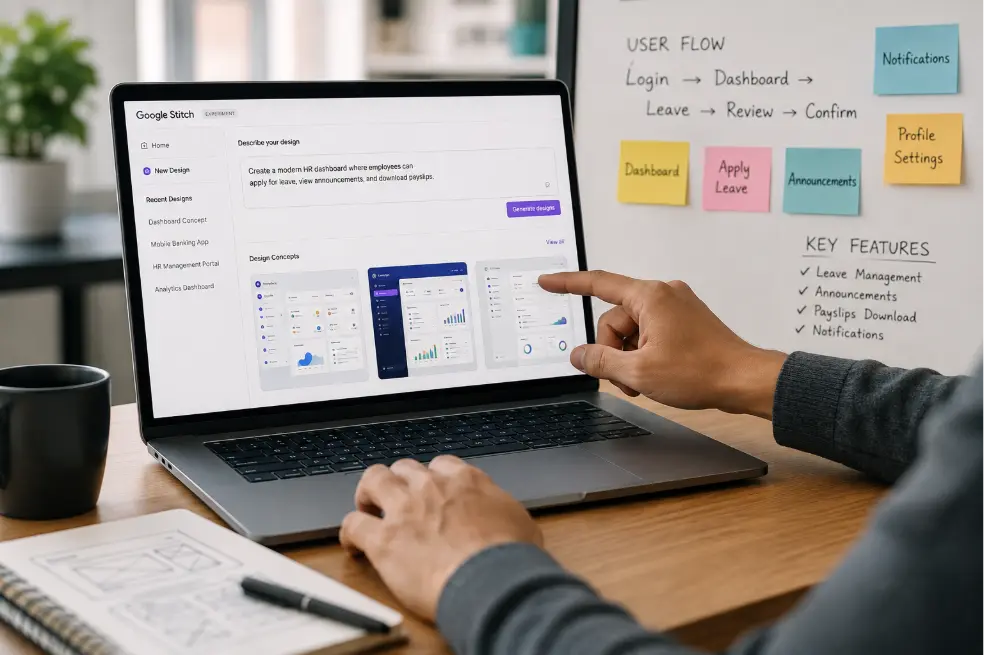
What if that entire process could begin with a simple conversation? That is exactly the problem Google Stitch is trying to solve. Rather than starting with a blank design canvas, Google Stitch allows you to describe your product idea in plain language and instantly transforms it into interactive UI concepts. It bridges the gap between business requirements and visual design, enabling teams to collaborate earlier, validate ideas faster, and accelerate product development.
- What Is Google Stitch?
- Google Stitch is an AI-powered UI design platform developed by Google Labs that converts text prompts, sketches, screenshots, and even voice instructions into high-fidelity user interface designs.
Instead of manually creating every screen from scratch, users simply describe what they want to build. Stitch understands the intent behind the request and generates interface layouts that can be refined, prototyped, and exported for further development.
For example, you can simply type: “Create a project management dashboard with task lists, project progress, team members, and performance charts.” Or, “Design a mobile banking application with account balance, recent transactions, bill payments, and fund transfers.”
Within seconds, Stitch produces multiple design concepts based on your requirements. Think of it as an AI design partner that helps you move from idea to interface significantly faster.
- Why Google Stitch Matters
- Traditional software development follows a familiar pattern — business requirements, wireframes, UI design, prototype, development. While this workflow is effective, it often involves multiple review cycles before stakeholders can actually visualize the product.
This creates several challenges:
- Business requirements are difficult for non-technical stakeholders to visualize.
- Designers spend valuable time creating initial layouts instead of refining user experiences.
- Developers wait for finalized designs before implementation begins.
- Feedback arrives late, resulting in expensive design changes.
Google Stitch shortens this entire cycle by generating interface concepts at the earliest stage of product planning. Instead of discussing abstract ideas, everyone — from clients to developers — can review an actual interface within minutes.
That simple shift leads to better discussions, quicker decisions, and fewer misunderstandings throughout the project lifecycle.
- How Google Stitch Works
- One of Stitch’s biggest strengths is its simplicity. You don’t need to be a professional designer to start using it.
Describe your product. Everything starts with a prompt. Instead of drawing wireframes, explain what you’re trying to build: “Design a healthcare appointment booking system where patients can search doctors, book appointments, and view medical history.” The more context you provide — such as your target users, business goals, preferred style, or accessibility needs — the better the generated designs become.
Generate multiple UI concepts. Based on your prompt, Stitch generates one or more interface layouts. Rather than giving you a single design, it explores different layouts and styles, making it easier to compare approaches before committing to one direction.
Refine using AI. Once a design is generated, you can continue the conversation naturally: “Use a dark theme.” “Replace the sidebar with bottom navigation.” “Add analytics charts.” “Make the interface more suitable for senior citizens.” “Simplify the dashboard.” Instead of editing every element manually, you simply tell Stitch what you want, and it updates the design accordingly. Recent versions also support voice-based interactions for an even more conversational workflow.
Build complete user flows. Designing a single screen is only the beginning. Google Stitch can generate multiple connected screens, helping teams visualize complete user journeys — from login and onboarding to dashboards, reports, and settings.
Export and continue development. Once you’re happy with the design, Stitch lets you continue your workflow by exporting editable designs to Figma or generating front-end code that developers can build upon. This creates a smoother transition between design and development instead of starting from scratch.
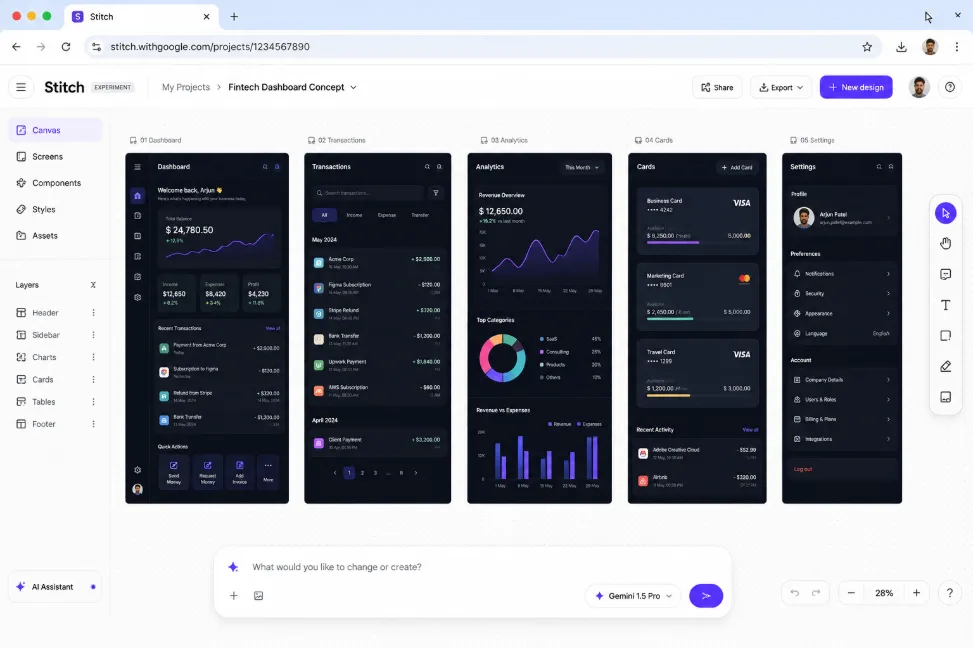
Steps four and five in one view: a whole flow rather than a screen, with the prompt bar still open underneath it. This is Google Stitch’s own interface — a Google Labs product, not an Ashvad one. - Key Features of Google Stitch
- Generate UI from natural language — describe your application in plain English, and Stitch transforms it into high-fidelity UI designs. No manual wireframing, no blank canvas — just describe your idea and let AI generate the first draft.
- Convert sketches and images into editable designs — already have a whiteboard sketch or hand-drawn wireframe? Upload it. Google Stitch can interpret images, screenshots and rough sketches, converting them into structured digital interfaces that are ready for refinement.
- Explore multiple design variations — good design is rarely created in the first attempt. Instead of manually redesigning the same screen several times, Stitch generates multiple layout variations, allowing teams to compare different approaches before making decisions.
- AI-powered iteration — need to change the navigation, improve accessibility, or prefer a cleaner layout? Simply ask. Stitch treats design changes as a conversation rather than a series of manual editing tasks.
- Interactive design canvas — Google’s latest version introduces an AI-native infinite canvas where text, images, code and design ideas can coexist in a single workspace. This allows teams to brainstorm, experiment and refine concepts without constantly switching between tools.
- Voice-based design assistance — instead of typing every instruction, users can speak naturally — “Reduce the header size.” “Show another dashboard layout.” “Improve the navigation.” The AI updates the design in real time, making collaboration more fluid during workshops or design reviews.
- Seamless handoff to development — Stitch doesn’t stop at design. It supports exporting designs to Figma for detailed refinement and can generate front-end code, helping developers begin implementation with a structured starting point instead of a blank project.
- Why Business Analysts Should Pay Attention
- When people hear “UI design”, they often assume it’s only relevant for designers. In reality, Google Stitch may be even more valuable for Business Analysts.
One of the biggest responsibilities of a Business Analyst is translating business needs into software requirements. The challenge is that requirement documents are often difficult for stakeholders to visualize.
Imagine explaining this requirement: “The dashboard should display sales performance, pending approvals, recent activities, KPIs, and notifications.” Now imagine showing the client a working interface generated within minutes.
The conversation immediately changes. Instead of asking “What do you mean?”, stakeholders begin asking “Can we move this chart here?” or “Can we add another filter?” That’s far more productive feedback.
Practical Use Cases for Business Analysts
Google Stitch can support Business Analysts throughout the software development lifecycle:
- Transform Business Requirement Documents (BRDs) into visual interface concepts.
- Create low-effort prototypes for stakeholder workshops.
- Validate functional requirements before detailed UI design begins.
- Demonstrate user journeys during requirement gathering sessions.
- Reduce ambiguity before handing requirements to designers and developers.
- Support sprint planning by visualizing features before implementation.
- Present clickable concepts during client demos and requirement sign-offs.
Instead of relying solely on lengthy documentation, Business Analysts can communicate ideas visually, making discussions faster and far more effective.
- Where Google Stitch Fits in Your Product Development Process
- Rather than replacing your existing design tools, Stitch enhances the early stages of product development.
A typical workflow looks like this:
- Business idea
- Requirement gathering
- Google Stitch
- Visual validation with stakeholders
- UI/UX refinement in Figma
- Development
- Testing and release
This allows teams to identify issues much earlier, when changes are significantly less expensive.
- Is Google Stitch Replacing Designers?
- No — and that’s not its purpose. Google Stitch excels at generating interface concepts quickly, but it doesn’t replace the human aspects of UX design.
- It cannot conduct user research.
- It doesn’t understand your customers’ emotions.
- It won’t define your brand strategy or create a long-term design system.
Experienced designers are still responsible for accessibility, interaction design, usability testing, visual hierarchy, and crafting exceptional user experiences.
Think of Google Stitch as an accelerator, not a replacement. It removes repetitive work so designers and product teams can spend more time solving meaningful problems.
In closing
Google Stitch represents more than just another AI design tool: it changes how product teams collaborate. For UI/UX designers, it removes the friction of starting from a blank canvas. For developers, it provides a clearer starting point for implementation. For Product Managers, it accelerates product discovery. And for Business Analysts, it transforms written requirements into visual experiences that stakeholders can understand immediately.
The real value of Google Stitch isn’t simply generating beautiful screens — it’s helping teams communicate better, validate ideas earlier, and deliver better products faster.
As AI becomes an integral part of modern software development, tools like Google Stitch won’t replace human creativity. Instead, they’ll empower cross-functional teams to spend less time translating ideas and more time building products that truly solve business problems.